UI interface
of SDOF-Tab/ LVL App
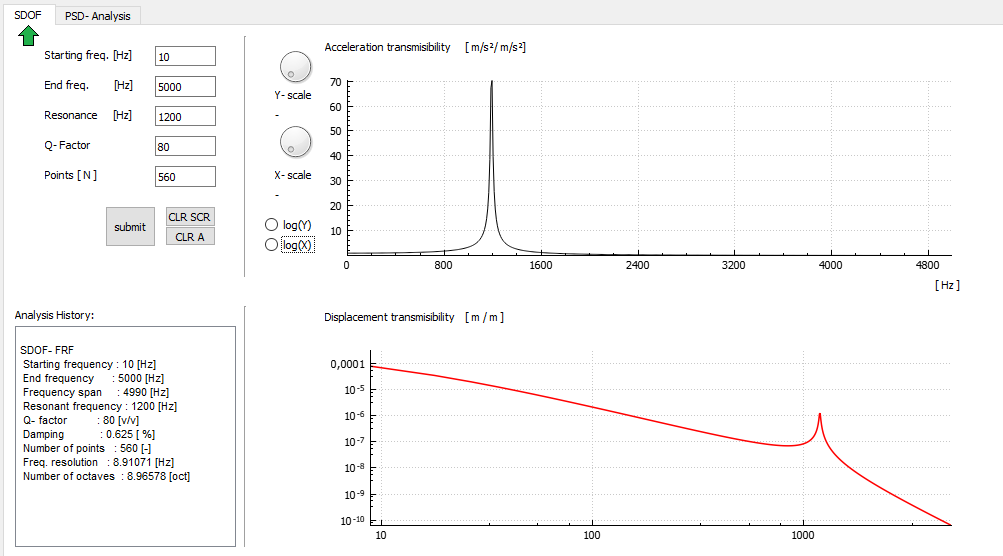
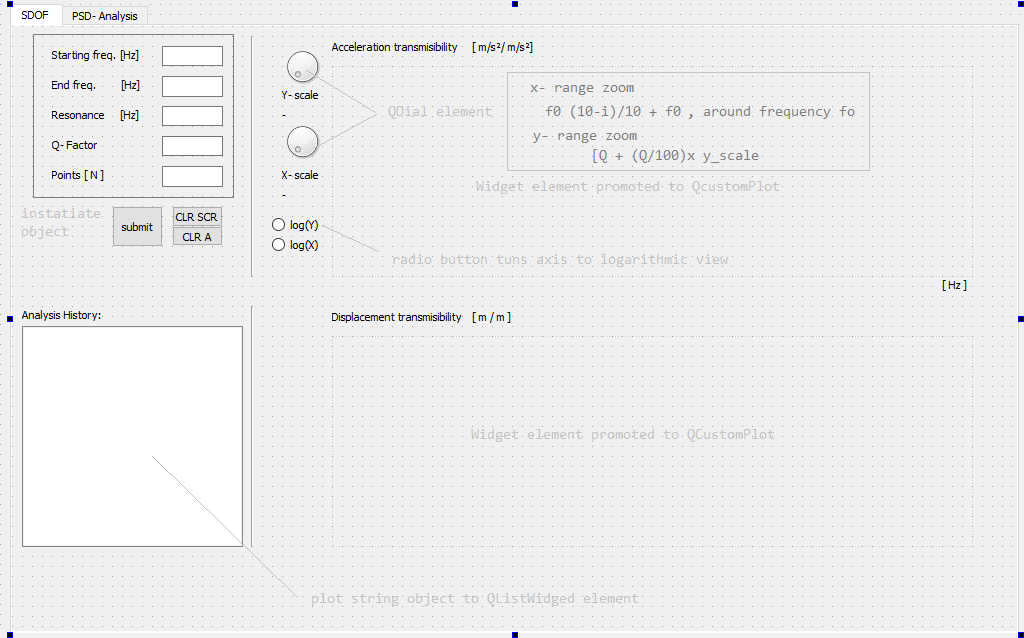
Now, previously developed classes deserve to be get some user interface.
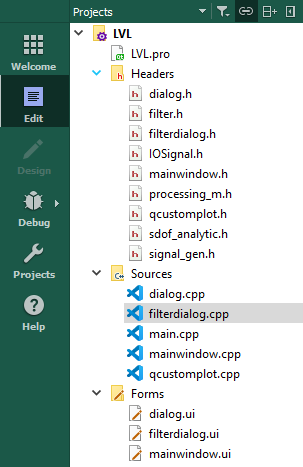
            QT       += core gui
            greaterThan(QT_MAJOR_VERSION, 4): QT += widgets printsupport
            CONFIG += c++11

            # You can make your code fail to compile if it uses deprecated APIs.
            # In order to do so, uncomment the following line.
            #DEFINES += QT_DISABLE_DEPRECATED_BEFORE=0x060000    # disables all the APIs deprecated before Qt 6.0.0

            SOURCES += \
                dialog.cpp \
                filterdialog.cpp \
                main.cpp \
                mainwindow.cpp \
                qcustomplot.cpp

            HEADERS += \
                ../../../Desktop/hariRama.h \
                IOSignal.h \
                dialog.h \
                filter.h \
                filterdialog.h \
                mainwindow.h \
                processing_m.h \
                qcustomplot.h \
                sdof_analytic.h \
                signal_gen.h

            FORMS += \
                dialog.ui \
                filterdialog.ui \
                mainwindow.ui

            # Default rules for deployment.
            qnx: target.path = /tmp/$${TARGET}/bin
            else: unix:!android: target.path = /opt/$${TARGET}/bin
            !isEmpty(target.path): INSTALLS += target
            #ifndef MAINWINDOW_H
            #define MAINWINDOW_H

            #include
            #include "filterdialog.h"

            QT_BEGIN_NAMESPACE
            namespace Ui { class MainWindow; }
            QT_END_NAMESPACE

            class MainWindow : public QMainWindow
            {
                Q_OBJECT

            public:
                MainWindow(QWidget *parent = nullptr);
                ~MainWindow();

            private:

                Ui::MainWindow *ui;
                FilterDialog* myFilter;
                QVector ti, ch_1;


            private slots:

                // 1st TAB:: SDOF
                void cmdSysClicked();    //command button creates the inputs and generates the data
                void cmdClearClicked();  // clears the plots
                void cmdCLRAClicked();   // clears plots and the history of analysis in QListwidget

                void yAxisScaler();
                void xAxisScaler();
                void logAxis();


             /* Caution: Class can be finished here, but it is not, another tab is yet to come...
              };
              #endif // MAINWINDOW_H

              */
        #include "mainwindow.h"
        #include "ui_mainwindow.h"

        #include < QMessageBox >
        #include < QDebug >
        #include < QtMath >
        #include < QSharedPointer >
        #include < QDialog >

        #include "sdof_analytic.h"
        #include "IOSignal.h"
        #include "filter.h"
        #include "dialog.h"

        #include "filterdialog.h"

        MainWindow::MainWindow(QWidget *parent)
            : QMainWindow(parent)
            , ui(new Ui::MainWindow)
        {
            ui->setupUi(this);

            //  TAB::: SDOF
            //
            //
            //*********************************************************************|

            // x and y axis scalers
            ui->dialYaxis->setMaximum(100);
            ui->dialYaxis->setMinimum(0);
            ui->dialXaxis->setMaximum(10);
            ui->dialXaxis->setMinimum(0);


            // y radio buttons:: not exclusive
            ui->radioLogX->setAutoExclusive(false);
            ui->radioLogY->setAutoExclusive(false);


            ui->radYlogS->setAutoExclusive(false);
            ui->radXlogS->setAutoExclusive(false);

            // connect the radiobuttons
            connect(ui->cmdSys, SIGNAL(clicked()), SLOT(cmdSysClicked()));
            connect(ui->cmdClear, SIGNAL(clicked()), SLOT(cmdClearClicked()));
            connect(ui->cmdCLRA, SIGNAL(clicked()),SLOT(cmdCLRAClicked()));

            // connect the scaling
            connect(ui->dialYaxis ,SIGNAL(valueChanged(int)),SLOT(yAxisScaler()));
            connect(ui->dialXaxis ,SIGNAL(valueChanged(int)),SLOT(xAxisScaler()));

            // connect radio buttons::: both call the same function logAxis
            connect(ui->radioLogX,SIGNAL(clicked()), SLOT(logAxis()));
            connect(ui->radioLogY,SIGNAL(clicked()), SLOT(logAxis()));

           }
void MainWindow::cmdSysClicked()
{
  // take the UI inputs
       double fstart= ui->edtStart->text().toDouble();
       double fend  = ui->edtEnd->text().toDouble();
       double fr    = ui->edtR->text().toDouble();
       double q     = ui->edtQ->text().toDouble();
       double N     = ui->edtN->text().toDouble();

       // create an SDOF - object ...
          Sdof_analytic sys(fstart, fend, fr, q, N);
          sys.FRF_THIS();
          vector frf = sys.getFRFVector();


       QVector y = QVector(frf.begin(), frf.end());

       QVector x,xd;
       double  df = (fend-fstart)/N;
       double f=0;
       double disp;

       for(int j = 0; j < y.size(); j++)
           {
               x.push_back(f);
               f +=df;
               disp = y[j]/pow((2*M_PI*f),2);
               xd.push_back(disp);
           }

       // Add Graphs

       ui->Plot1->addGraph();
       ui->Plot1->graph(0)->setPen(QPen(Qt::black, 1));
       ui->Plot1->graph(0)->setData(x,y);
       ui->Plot1->update();
       ui->Plot1->rescaleAxes();
       ui->Plot1->replot();

       ui->Plot1->setInteractions(QCP::iRangeDrag | QCP::iRangeZoom);
       ui->Plot2->addGraph();
       ui->Plot2->graph(0)->setPen(QPen(Qt::red, 1.5));
       ui->Plot2->xAxis->setScaleType(QCPAxis::stLogarithmic);
       ui->Plot2->yAxis->setScaleType(QCPAxis::stLogarithmic);

       ui->Plot2->graph(0)->setData(x,xd);
       ui->Plot2->update();
       ui->Plot2->rescaleAxes();
       ui->Plot2->replot();
       ui->Plot2->setInteractions(QCP::iRangeDrag | QCP::iRangeZoom);


       // ADAPTER:: reuse cout << str()/ofstream and plug it in Q String;
       string s = sys.sdof_info();
       QString qstr = QString::fromStdString(s);

       ui->lstAnalysis->addItem(qstr);
}
void MainWindow::cmdClearClicked()
{
    ui->Plot1->graph(0)->clearData();
    QVector x,y;

    ui->Plot1->graph(0)->setData(x,y);
    ui->Plot1->update();
    ui->Plot1->rescaleAxes();
    ui->Plot1->replot();
    ui->Plot2->graph(0)->setData(x,y);
    ui->Plot2->update();
    ui->Plot2->rescaleAxes();
    ui->Plot2->replot();

}
  void MainWindow::cmdCLRAClicked()
  {
      ui->lstAnalysis->clear();

  }
  // manipulationg xAxisSclaer
  void MainWindow::xAxisScaler()
  {
      double i = ui->dialXaxis->value();
      double f = ui->edtR->text().toDouble();
      double xrange = f*((10-i)/10);
      ui -> lblSlider -> setText(QString("%1").arg(i));
      ui->Plot1->xAxis->setRange(f-xrange, f+xrange);
      ui->Plot1-> replot();

  }

  // manipulate radio buttons for setting up the log. axis
  void MainWindow::logAxis()
  {
      // Chece when button clicked
      if( ui->radioLogY->isChecked()){

           ui->Plot1->yAxis->setScaleType(QCPAxis::stLogarithmic);
           ui->Plot1->update();
           ui->Plot1->rescaleAxes();
           ui->Plot1->replot();
       }
      else if(ui->radioLogY->isChecked()==false)
      {
          ui->Plot1->yAxis->setScaleType(QCPAxis::stLinear);
          ui->Plot1->update();
          ui->Plot1->rescaleAxes();
          ui->Plot1->replot();
      }


      if(ui->radioLogX->isChecked()==true)
      {
           ui->Plot1->xAxis->setScaleType(QCPAxis::stLogarithmic);
           ui->Plot1->update();
           ui->Plot1->rescaleAxes();
           ui->Plot1->replot();

      }
      else if(ui->radioLogX->isChecked()==false)
      {
          ui->Plot1->xAxis->setScaleType(QCPAxis::stLinear);
          ui->Plot1->update();
          ui->Plot1->rescaleAxes();
          ui->Plot1->replot();
      }
  }